Discord Message Builder
Build rich Discord webhook messages visually — formatted text, embed-style cards, media, buttons and select menus — against a live preview measured off the real Discord client.
No account required for the core builder. Nothing posts until you confirm it.
What a Discord message builder does
Discord's composer handles everyday chat, formatting, attachments and polls. A structured coloured card, text beside a thumbnail, or controls laid out with the message must instead arrive as a webhook or app payload. A message builder is the visual layer over that payload: you arrange the message the way you want people to read it, and the builder produces the JSON Discord accepts.
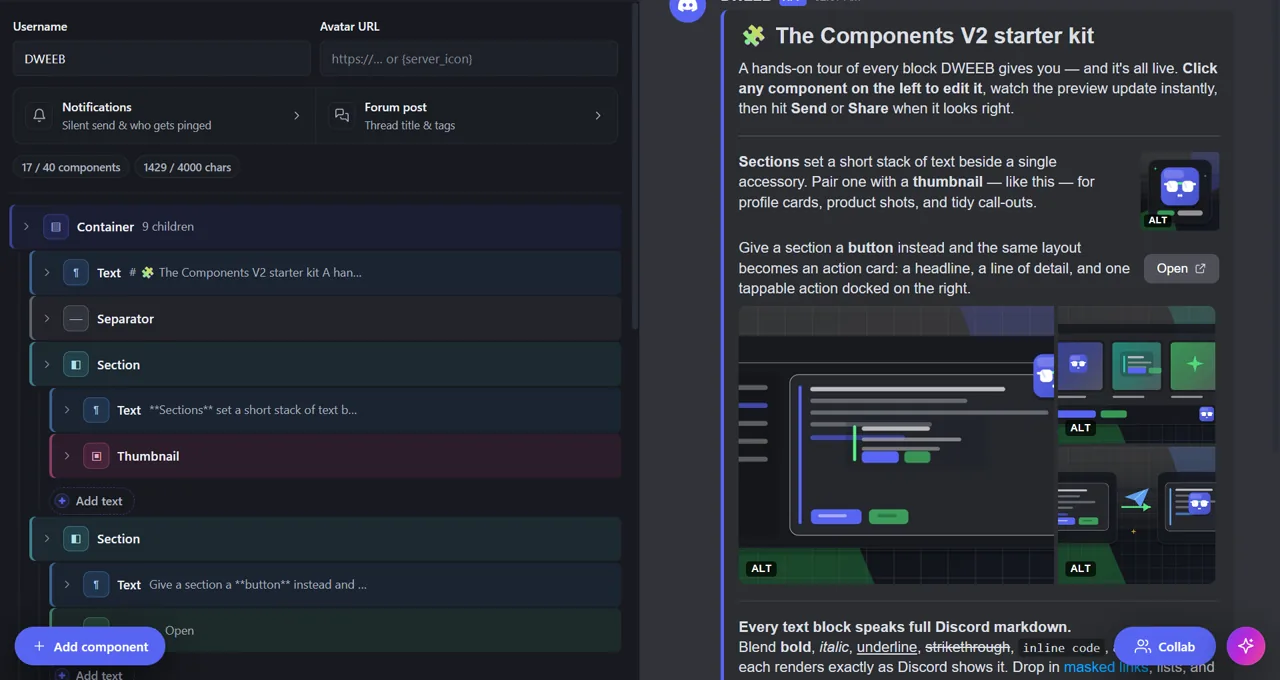
DWEEB is that layer and works as a Discord webhook message builder from first draft to delivery. Add blocks from a component tree, type straight into them, and watch a high-fidelity preview whose colours, spacing and image geometry are measured against the live Discord client. The test method and known font, emoji and client-version differences are documented. Discord's character and structure limits are enforced while you type, so a message is checked as you build instead of failing at the API.
Rich Discord webhook layouts, in one builder
One message can mix all of these. Up to 10 top-level blocks stack in whatever order you arrange them, which is what separates a Components V2 layout from a classic embed's fixed slots.
| What you want to post | How you build it | What it needs |
|---|---|---|
| Announcements and formatted text | Text Displays with Discord markdown, headings, lists, mentions and timestamps | Any webhook |
| An embed-style card | A Container with an accent colour, text and media inside it | Any webhook |
| A banner or an image gallery | A Media Gallery of up to 10 images, with optional spoilers | Any webhook |
| Text beside a small image | A Section with a thumbnail accessory | Any webhook |
| Links to your site, docs or store | An Action Row of up to 5 link buttons | Any webhook |
| Buttons and menus that act on a click | Interactive buttons or select menus paired with a built-in feature | An app-owned webhook |
| Roles, tickets, forms or giveaways | The same message, with a guided plugin attached to the control | An installed app |
From blank canvas to posted message
- Start blank, from an editable template, or by pasting webhook JSON you already have
- Rearrange blocks in a component tree and edit each one in place
- Check the measured, high-fidelity preview at desktop and mobile widths
- Set the display name and avatar the message is posted under
- Send to a pasted webhook URL, or pick a connected server and channel
- Restore a message the webhook already posted and update it in place
- Schedule the post for later, or hand the draft to someone else as one link
- Export the finished message as JSON whenever you want the payload itself
Where the message is delivered
A standard incoming webhook — the kind anyone with Manage Webhooks can create in channel settings — carries text, layout, colour, media and link buttons. That covers most of what a server posts.
Discord only routes a click back to software when the message was posted by an application-owned webhook, so custom buttons and select menus need one. Actions that change the server, such as assigning a role or opening a private ticket channel, additionally need an app installed with the relevant permissions.
The builder labels which of the three a design needs before you commit to it, so you find out while you are still editing rather than at the send step.
Built for servers that post regularly
One-off builders stop at the send button. DWEEB keeps the message afterwards: a per-server library of what you posted and what is still a draft, scheduled posts with an upcoming queue, in-place editing of anything the webhook sent, and a webhook manager for the channels you publish to.
For teams, the builder also runs inside Discord as an embedded Activity so several people can edit one draft together, and an AI assistant can draft or restructure a message from a plain-English description. Plus and Pro plans raise per-server quotas on those hosted extras; they never lock an editor feature.
Visual builder or raw JSON — the same message either way
Every message here has two forms: the layout you arrange on screen, and the components payload Discord accepts. DWEEB keeps both in sync and hands you either one. Export the finished message as JSON at any point, paste it into your own project, and send it from discord.js, discord.py, or a plain HTTPS POST to the webhook URL — the payload is the same one the send button uses.
Import works the other way too. Paste a payload you already have — including a legacy embeds array — and it opens as an editable design rather than a wall of braces, which is usually the fastest way to adjust a message some code is already sending.
If you were looking for a builder class in a bot library, such as discord.js's MessageBuilder, that is the code-side way to assemble the same payload. This page is the visual layer over it, and the two coexist: design and check the message here, export the JSON, and let your bot send it. The Components V2 guide documents the payload shape, every component type and the limits each one enforces.
An AI client can drive the same builder directly through DWEEB's MCP connector, which exposes the templates, validation and preview as tools rather than asking a model to guess at the JSON.
Free, local by default, no account for the core builder
The editor is free for noncommercial use and source-available. Your working draft, browser saves, recent webhook URLs and attachments stay on your device, and a default share link carries its message in the URL fragment, which browsers never send to a server. Optional features — short links, schedules, server libraries, collaboration, AI and billing — process only what they need to work, and the Privacy Policy itemises each one.
Nothing is posted until you review the preview and confirm it.
Frequently asked questions
What is a Discord message builder?
It is a visual editor for the rich messages Discord's own composer cannot send. You lay the message out on screen — text, colours, images, buttons, menus — and the builder generates the webhook payload Discord accepts, so the JSON is produced for you rather than written by hand.
Is DWEEB's Discord message builder free?
Yes. The full editor is free for noncommercial use, needs no account, and runs in the browser. Optional per-server Plus and Pro plans only raise quotas on hosted extras such as scheduled posts and saved messages — no editor feature is locked behind a plan.
Do I need a Discord bot to use it?
No. Any incoming webhook URL is enough for text, layout, media and link buttons. A bot or application-owned webhook is only required when a button or select menu has to respond to a click, and the builder tells you when a design has crossed that line.
Is this the same as discord.js's MessageBuilder?
No, and they are not alternatives. MessageBuilder is a class in the discord.js library that assembles the message payload in code. DWEEB is a visual editor that produces the same payload without code, and exports it as JSON — so you can design and check a message here and still send it from your own bot.
Can I export the message as JSON?
Yes. Any message can be exported as the exact webhook payload Discord accepts, and pasting a payload back in reopens it as an editable design. Nothing is locked to DWEEB.
Can I build Discord embeds with it?
Yes. The classic embed look — accent stripe, title, description, thumbnail, image, footer — is built from a Container with sections and media, and you can paste a webhook payload containing an embeds array to convert it. The embed builder page explains how each legacy field maps across.
Can I edit a Discord message after I have sent it?
Yes. Paste the message link or pick the post from your server library, edit it in the builder, and update the original in place through the same webhook, so it keeps its position in the channel.
Is a message builder the same as an embed generator?
In everyday use, yes — embed generator, embed creator and message maker all describe a visual editor for rich Discord messages. The distinction that matters is what comes out. A legacy embed is one fixed card with named slots; a Components V2 message is a layout you arrange, which can hold several blocks, media and controls. DWEEB builds the second and imports the first, so an existing embed payload opens as an editable design.
Does it work on a phone?
Yes. The builder is responsive, and the preview opens as a sheet over the editor on small screens so you can check the result without leaving the block you are editing.
Where does my message go while I am building it?
The working draft stays in your browser. It reaches Discord only when you press send, through the webhook you chose, and reaches DWEEB's own services only for the optional features you turn on, such as scheduling or a server library.
Documentation and testing
Learn or start from a proven design
Build the message now
Use the visual editor free, or start from an editable Components V2 template.
Open DWEEB →