Discord Product Card Template
Show off a product with a clean listing card: a thumbnail, price, rating and a buy button, all in one tidy section. Ideal for merch drops, digital goods or affiliate picks shared straight into your server.
✨ Aurora Hoodie
$48.00 · Free shipping over $50
Ultra-soft brushed fleece in three colourways. Runs true to size.
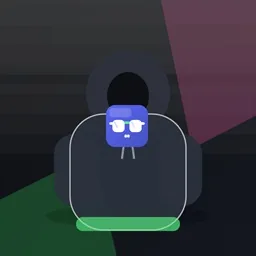
⭐ 4.8/5 from 320+ reviews · 🚚 Ships in 1–2 business days
Copy and paste the Discord Product Card text
This is the template's text as Discord markdown. Paste it into any channel and the headings, bold text, lists and subtext format exactly as they do in the preview; the card, buttons and menus come with the full template when you open it in DWEEB. The Discord text formatting guide explains every piece of syntax it uses.
# ✨ Aurora Hoodie
**$48.00** · Free shipping over $50

Ultra-soft brushed fleece in three colourways. Runs true to size.

⭐ **4.8/5** from 320+ reviews · 🚚 Ships in 1–2 business days
When to use it
- Promoting merch, products or digital goods
- Sharing a shop listing with a buy link
- Featuring a product drop in your community
What's inside
Built with Discord's Components V2 layout system — the accent-striped card the Discord embed builder produces in place of a legacy embed:
- Container with accent stripe
- Section
- Thumbnail
- Separator
- Formatted text
- Buttons
Tips
- Every piece of text, colour, emoji and link is editable — open it in DWEEB and make it yours.
- It posts through any Discord webhook. No bot or application-owned webhook is required for this static message.
- Use the measured, high-fidelity preview to check the layout before you send.
How to use this template
- Open it in DWEEB. Click “Use this template free” to load the template into the visual editor — no sign-up, no install.
- Make it yours. Edit the text, colours, emoji, links and images to match your server. The live preview updates as you type.
- Paste your webhook URL. In Discord, go to Server Settings → Integrations → Webhooks, copy a webhook URL, and paste it into DWEEB. See the full webhook workflow.
- Send it. Review the live preview, then hit Send. You can also save it, share it as a link, schedule it, or export the message JSON.
Template JSON and compatibility
This example contains 1 top-level blocks and 9 components including nested blocks. Its text fields use 216 characters of the editor's message budget. The JSON below is exported from the same template that opens in DWEEB.
Import it through DWEEB's JSON panel, or adapt it for your own application. This is a Components V2 payload with flags: 32768, not a legacy embeds array. When executing a webhook yourself, include with_components=true in the request URL. See the Components V2 JSON reference for delivery requirements.
The layout can be sent through an ordinary incoming webhook. Link buttons open their URLs; they do not run a bot action.
Replace example text, images, links and any server placeholders before posting. Discord does not expand DWEEB placeholders when you send raw JSON from your own code. Review allowed mentions before sending text that names users or roles.
Download Discord Product Card JSON
View the complete template JSON
{
  "username": "Shop",
  "components": [
    {
      "type": 17,
      "accent_color": 15418782,
      "components": [
        {
          "type": 9,
          "components": [
            {
              "type": 10,
              "content": "# ✨ Aurora Hoodie\n**$48.00** · Free shipping over $50\n\nUltra-soft brushed fleece in three colourways. Runs true to size."
            }
          ],
          "accessory": {
            "type": 11,
            "media": {
              "url": "https://dweeb.faizo.net/media/defaults/dweeb-product-hoodie.jpg"
            },
            "description": "Aurora Hoodie"
          }
        },
        {
          "type": 14,
          "divider": true,
          "spacing": 1
        },
        {
          "type": 10,
          "content": "⭐ **4.8/5** from 320+ reviews · 🚚 Ships in 1–2 business days"
        },
        {
          "type": 1,
          "components": [
            {
              "type": 2,
              "style": 5,
              "label": "Buy now",
              "url": "https://example.com/product"
            },
            {
              "type": 2,
              "style": 5,
              "label": "View sizing",
              "url": "https://example.com/sizing"
            }
          ]
        }
      ]
    }
  ],
  "flags": 32768
}
Use this template in a bot
The same message as a discord.js or discord.py bot sends it. Both are generated from the template above by DWEEB's code generator; for a cURL, JavaScript or Python webhook request, open the template with the Code tab.
discord.js code
// Components V2 message — discord.js v14.19 or newer.
// Designed in DWEEB (https://dweeb.faizo.net). Edit the text, then send.
const {
  ActionRowBuilder,
  ButtonBuilder,
  ButtonStyle,
  ContainerBuilder,
  MessageFlags,
  SectionBuilder,
  SeparatorBuilder,
  SeparatorSpacingSize,
  TextDisplayBuilder,
  ThumbnailBuilder,
} = require("discord.js");

const container = new ContainerBuilder()
  .setAccentColor(0xeb459e)
  .addSectionComponents(
    new SectionBuilder()
      .addTextDisplayComponents(
        new TextDisplayBuilder().setContent(
          [
            "# ✨ Aurora Hoodie",
            "**$48.00** · Free shipping over $50",
            "",
            "Ultra-soft brushed fleece in three colourways. Runs true to size.",
          ].join("\n"),
        ),
      )
      .setThumbnailAccessory(
        new ThumbnailBuilder()
          .setURL("https://dweeb.faizo.net/media/defaults/dweeb-product-hoodie.jpg")
          .setDescription("Aurora Hoodie"),
      ),
  )
  .addSeparatorComponents(
    new SeparatorBuilder().setDivider(true).setSpacing(SeparatorSpacingSize.Small),
  )
  .addTextDisplayComponents(
    new TextDisplayBuilder().setContent(
      "⭐ **4.8/5** from 320+ reviews · 🚚 Ships in 1–2 business days",
    ),
  )
  .addActionRowComponents(
    new ActionRowBuilder().addComponents(
      new ButtonBuilder()
        .setStyle(ButtonStyle.Link)
        .setLabel("Buy now")
        .setURL("https://example.com/product"),
      new ButtonBuilder()
        .setStyle(ButtonStyle.Link)
        .setLabel("View sizing")
        .setURL("https://example.com/sizing"),
    ),
  );

// The design also sets username "Shop" — webhook-only options that
// channel.send() has no equivalent for. WebhookClient#send accepts them.

// Send it from any async context: a command handler, an event, a script.
await channel.send({
  components: [container],
  flags: MessageFlags.IsComponentsV2,
});
discord.py code
# Components V2 message — discord.py 2.6 or newer.
# Designed in DWEEB (https://dweeb.faizo.net). Edit the text, then send.
import discord
from discord import ui


def build_view() -> ui.LayoutView:
    view = ui.LayoutView(timeout=None)
    view.add_item(
        ui.Container(
            ui.Section(
                ui.TextDisplay(
                    "# ✨ Aurora Hoodie\n"
                    "**$48.00** · Free shipping over $50\n"
                    "\n"
                    "Ultra-soft brushed fleece in three colourways. Runs true to size.",
                ),
                accessory=ui.Thumbnail(
                    "https://dweeb.faizo.net/media/defaults/dweeb-product-hoodie.jpg",
                    description="Aurora Hoodie",
                ),
            ),
            ui.Separator(visible=True, spacing=discord.SeparatorSpacing.small),
            ui.TextDisplay(
                "⭐ **4.8/5** from 320+ reviews · 🚚 Ships in 1–2 business days",
            ),
            ui.ActionRow(
                ui.Button(
                    style=discord.ButtonStyle.link,
                    label="Buy now",
                    url="https://example.com/product",
                ),
                ui.Button(
                    style=discord.ButtonStyle.link,
                    label="View sizing",
                    url="https://example.com/sizing",
                ),
            ),
            accent_colour=0xeb459e,
        ),
    )
    return view


# The design also sets username "Shop" — webhook-only options that
# channel.send() has no equivalent for. discord.Webhook.send accepts them.

# Send it from any coroutine: a command, an event listener, a task.
await channel.send(view=build_view())
Ready to use this template?
Open it in the visual Discord message builder, customize it for your server, and review the result before sending.
Use “Discord Product Card” →Frequently asked questions
Do I need a bot to use this template?
No. This template contains only layout, text, media and link buttons, so any Discord webhook can post it. No application-owned webhook is required.
How do I use this Product card template?
Click “Use this template free” to load it into the visual editor, change the text, colours and links to fit your server, then pick a channel or paste your Discord webhook URL and hit Send. You can also share it as a single link or export the message JSON.
Is DWEEB free?
Yes. DWEEB's full visual builder is free and needs no account. Working drafts and browser saves are local by default; optional connected features such as schedules, server libraries, AI, and plugins use the data required to work.